Students के लिए Google Subscription Refund Guide – पूरी जानकारी आसान भाषा में
जनवरी 14, 2026
Google Subscription Refund Guide: Auto-Renewal की समस्या क्यों आती है?
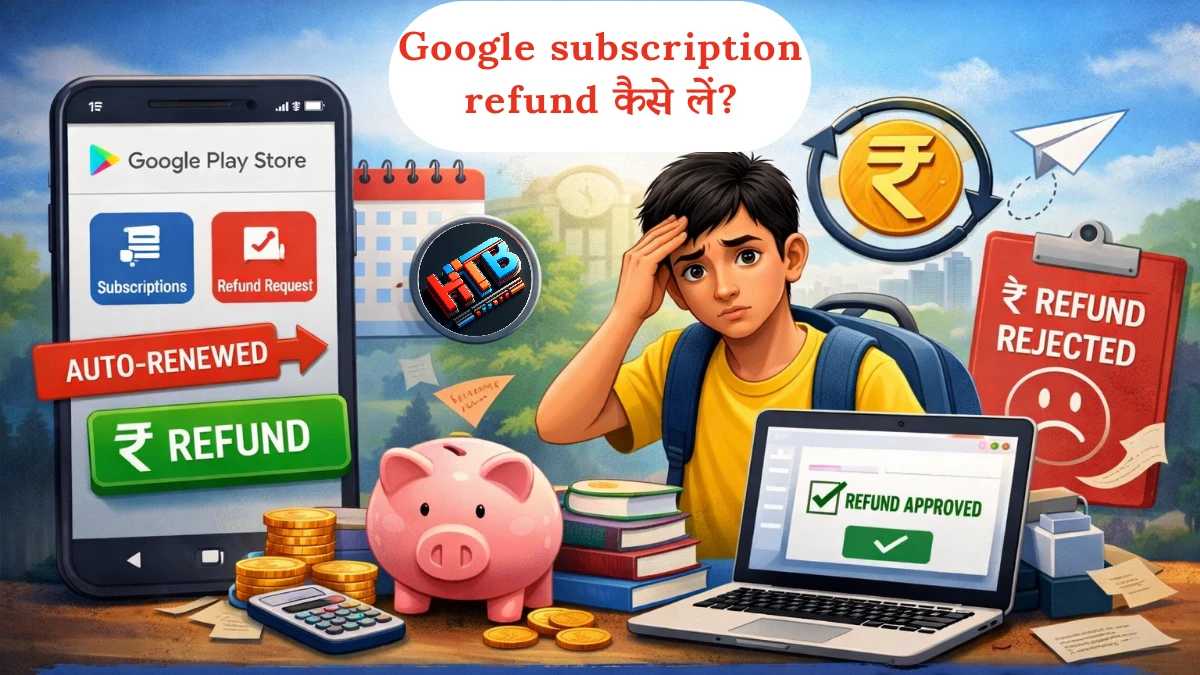
Students के लिए Google Play subscription auto-renewal और refund process को समझाने वाला visual guide
आज के digital दौर में students पढ़ाई, cloud storage, entertainment और productivity के लिए Google की कई services जैसे Google Drive storage, learning apps और Play Store subscriptions का इस्तेमाल करते हैं। कई बार ये services free trial के साथ available होती हैं, जिससे users बिना तुरंत payment किए features try कर सकते हैं।
हालांकि, free trial activate करते समय ज़्यादातर subscriptions में auto-renewal पहले से enabled होता है। इसका मतलब यह होता है कि trial period खत्म होने पर, अगर user ने subscription manually cancel नहीं की,
तो तय amount automatically charge हो सकता है। यह process Google Play की standard subscription system का हिस्सा है और terms में पहले से mention रहता है।
Students के साथ problem अक्सर इसलिए होती है क्योंकि free trial लेते समय उन्हें ये पूरी तरह clear नहीं होता कि trial खत्म होने के बाद payment automatically start हो सकती है। कभी-कभी study pressure, notifications ignore करना, या subscription settings check न करना भी इसका कारण बन जाता है। Result में user को बाद में notification मिलता है — “Your subscription has been renewed” — और linked payment method से amount deduct हो जाती है।
Students के लिए ये situation confusing और financially uncomfortable हो सकती है, क्योंकि ज़्यादातर students limited pocket money या fixed monthly allowance पर depend करते हैं। ऐसे में अचानक subscription charge लगने पर सबसे common सवाल होता है — “क्या Google subscription refund मिल सकता है?”
यह जानना जरूरी है कि Google की refund policy पूरी तरह automatic नहीं होती, लेकिन कुछ cases में refund possible होता है — जैसे accidental purchase, unused subscription, या समय पर request करने की situation में। Refund approval, Google Play refund policies, usage status और request timing पर depend करता है।
इस guide में हम students के perspective से साफ़ और factual तरीके से समझेंगे कि accidental Google subscription refund कैसे request किया जा सकता है,
Google subscription system कैसे work करता है, और future में ऐसी situation avoid करने के लिए कौन-सी practical precautions अपनानी चाहिए।
अगर आप student हैं और Google Play Store subscription से जुड़ी awareness चाहते हैं, या future में unwanted charges से safe रहना चाहते हैं, तो यह guide आपको systems को समझने और better decisions लेने में मदद करेगी।
Google Subscription क्या होती है और Students इसमें कैसे शामिल हो जाते हैं?
Google subscription एक paid digital service होती है, जिसमें user किसी app या service के premium features को monthly या yearly fee देकर इस्तेमाल करता है। ये subscriptions ज़्यादातर Google Play Store के ज़रिए manage होती हैं और इनका billing system Google Play की subscription policies के अनुसार काम करता है।
Students अक्सर apps install करते समय free trial या limited-time offer देखते हैं। Free trial का मतलब यह होता है कि तय period तक service बिना charge के इस्तेमाल की जा सकती है, लेकिन trial start करते समय user को एक valid payment method (जैसे UPI, debit card या किसी family member का card) account से link करना होता है। यह step verification और future billing के लिए जरूरी होता है।
Subscription लेना अपने आप में कोई गलती नहीं है। Confusion तब होती है जब free trial खत्म होने के बाद subscription automatically renew हो जाती है। Google Play की subscription system में ज़्यादातर trials के साथ auto-renewal पहले से enabled रहता है। इसका मतलब यह है कि अगर user trial period खत्म होने से पहले subscription cancel नहीं करता, तो अगली billing cycle में तय amount automatically charge हो सकता है।
Google Play policies के अनुसार, auto-renewal के लिए अलग से confirmation नहीं लिया जाता, क्योंकि इसकी जानकारी signup के समय pricing details, billing terms और subscription page पर पहले से दी जाती है।
इसी वजह से कई students को बाद में ऐसा महसूस होता है कि subscription unintentionally renew हो गई।
Students आमतौर पर कौन-सी Google Subscriptions लेते हैं?
Students के बीच कुछ तरह की subscriptions ज़्यादा common होती हैं:
Cloud storage से जुड़ी subscriptions, जैसे extra online storage plans
Learning, study या productivity apps के premium features
Entertainment और video streaming apps
Music streaming या ad-free content वाली services
इन सभी subscriptions में एक common system होता है — auto-renewal option default रूप से active रहता है। अगर user billing cycle के end से पहले cancel नहीं करता, तो subscription अगले cycle के लिए continue हो जाती है। Students कई बार terms, pricing details या renewal dates को ध्यान से review नहीं कर पाते, जिससे उन्हें billing structure पूरी तरह clear नहीं हो पाता।
Students के लिए ये समझना क्यों जरूरी है?
Students का budget आमतौर पर limited होता है और ज़्यादातर expenses pocket money या fixed monthly allowance से manage किए जाते हैं। ऐसे में अगर कोई Google Play Store subscription active रहती है और regular charges लगते रहते हैं, तो monthly खर्चों की planning पर असर पड़ सकता है।
इसीलिए students के लिए यह समझना important है कि Google subscription system कैसे work करता है, auto-renewal का meaning क्या है, और अगर कोई subscription expected नहीं थी या use नहीं की गई, तो Google subscription refund process किन situations में applicable हो सकता है। यह awareness students को better financial decisions लेने और future में unwanted charges avoid करने में मदद करती है।
Students द्वारा की जाने वाली Common Subscription Mistakes
अक्सर students को लगता है कि Google subscription से जुड़ी confusion सिर्फ उनके साथ हुई है, जबकि वास्तव में गलती से Google subscription renew हो जाना एक common situation है। Students digital services का regular use तो करते हैं, लेकिन subscription system और billing process को पूरी तरह समझना कभी-कभी मुश्किल हो जाता है।
1. Free Trial लेते समय Auto-Renewal को समझ न पाना
कई students free trial activate करते समय यह मान लेते हैं कि trial अपने आप खत्म हो जाएगा। लेकिन ज़्यादातर Google Play subscriptions में free trial के साथ auto-renewal पहले से enabled होता है। अगर trial period खत्म होने से पहले subscription cancel नहीं की जाती, तो अगली billing cycle में charge लग सकता है।
2. Subscription लेने के बाद समय पर Cancel न करना
कुछ students सोचते हैं कि subscription को बाद में cancel कर लेंगे। लेकिन studies, exams या daily routine की वजह से Google Play Store subscription को सही समय पर manage नहीं कर पाते। अगर subscription active रहती है, तो billing cycle के अनुसार charge continue हो सकता है।
3. Payment Method Saved होने के असर को न समझना
जब UPI, debit card या parent का card Google account से link होता है, तो subscription renew होने पर payment automatically process हो सकता है। Google Play में हर renewal पर अलग से manual approval जरूरी नहीं होता, क्योंकि user ने subscription start करते समय billing permission दी होती है।
4. Terms & Conditions और Billing Details Skip करना
Students अक्सर जल्दी में “Accept” पर click कर देते हैं और terms & conditions या pricing details ध्यान से review नहीं करते। इस वजह से उन्हें renewal date, cancellation timing या refund eligibility जैसी जानकारी clear नहीं होती।
5. Subscription Notifications पर ध्यान न देना
Google Play आमतौर पर subscription से जुड़ी जानकारी email या app notification के ज़रिए share करता है, जैसे upcoming renewal या payment confirmation। लेकिन students कई बार email regularly check नहीं करते या notifications को ignore कर देते हैं, जिससे important updates miss हो जाते हैं।
6. Parent के Card का Use करते समय Awareness की कमी
कुछ students, “Students के लिए Best Saving Apps” या services के लिए parents का card use करते हैं। अगर subscription settings और auto-renewal system clear न हो, तो renewal होने पर situation uncomfortable हो सकती है। इसलिए shared payment methods के साथ extra awareness जरूरी होती है।
इन common situations की वजह से ही students बाद में “Google subscription refund कैसे लें?” जैसे questions search करते हैं। यह समझना important है कि refund हर case में guaranteed नहीं होता, लेकिन अगर subscription unintended थी और समय पर action लिया जाए, तो कुछ situations में refund request possible हो सकती है।
Real Experience से सीख: गलती से Subscription Renew होने पर Panic नहीं, Process समझना जरूरी है
जब किसी student के साथ गलती से Google subscription renew हो जाती है, तो शुरुआत में confusion और anxiety होना common है। Notification देखते ही कई students को ऐसा लगता है कि “अब पैसे वापस नहीं मिलेंगे” या “पूरा amount waste हो गया”।
लेकिन practical experience और available information से यह समझ में आता है कि Google subscription system पूरी तरह process-based होता है। अगर किसी subscription का renewal unintended था, तो Google Play users को refund request submit करने का option देता है, हालाँकि approval हर case में automatic नहीं होता।
इस तरह की situations से एक important learning यह मिलती है कि panic करने के बजाय system को समझना ज़्यादा helpful होता है। Google Play refund process time-sensitive होता है, इसलिए जितनी जल्दी user Google Play refund request करने का सही तरीका use करता है, उतनी clarity के साथ case evaluate किया जा सकता है।
यह भी समझना जरूरी है कि accidental Google subscription के cases में refund decision कई factors पर depend करता है, जैसे subscription का usage status, renewal के बाद कितना समय बीता है, और request के दौरान दिया गया reason। Genuine और clear explanation देने से request को सही तरीके से review किया जा सकता है।
इसलिए students के लिए सबसे practical approach यही है कि अगर कभी Google Play Store subscription से unintended charge लग जाए, तो डरने के बजाय calmly refund process को समझें और official steps follow करते हुए request submit करें।
आगे के sections में detail में explain किया जाएगा कि Google refund policy students के लिए क्या कहती है? refund किन situations में possible हो सकता है, और Google subscription refund कैसे लें? — पूरे step-by-step guidance के साथ।
Google Subscription Refund Policy – Students के लिए आसान भाषा में
Google subscription refund policy को समझना students के लिए जरूरी है, क्योंकि हर subscription charge पर refund automatically नहीं मिलता। Google Play Store पर refund eligibility कई factors पर depend करती है, जैसे subscription का type, usage status और refund request कब submit की गई है।
Google Play की policies के अनुसार, refund request समय पर submit करना एक important factor होता है। इसका मतलब यह है कि जैसे ही user को पता चले कि Google Play Store subscription unintended तरीके से renew हो गई है, उसी समय official refund process शुरू करना बेहतर रहता है।
किन situations में Google Subscription Refund possible हो सकता है?
अगर subscription unintended या accidental तरीके से renew हुई हो
अगर renewal के बाद service का use बहुत कम या बिल्कुल न किया गया हो
अगर free trial खत्म होते ही तुरंत charge लग गया हो और user ने जल्दी action लिया हो
अगर refund request renewal के तुरंत बाद submit की गई हो
किन situations में Refund मिलना difficult हो सकता है?
अगर subscription लंबे समय से active हो और multiple billing cycles पूरे हो चुके हों
अगर paid features या services का regular या heavy usage हो चुका हो
अगर charge होने के काफी समय बाद refund request की गई हो
अगर same account से बार-बार refund requests submit की गई हों
Students के लिए यह समझना important है कि Google refund policy पूरी तरह automated और policy-driven system पर based होती है। Refund request submit करते समय reason को clearly और honestly explain करना helpful होता है, ताकि system request को सही context में evaluate कर सके।
यह भी ध्यान रखना जरूरी है कि refund approve होगा या नहीं, इसका final decision Google Play की policies और system review पर depend करता है, ना कि सिर्फ refund request submit करने पर।
फिर भी, अगर students सही तरीके से Google subscription refund कैसे लें इस process को समझकर timely action लेते हैं, तो कई situations में refund possible हो सकता है।
Step-by-Step: Google Subscription Refund कैसे लें? (Students Friendly Guide)
अगर किसी student के साथ गलती से Google subscription renew हो गई है, तो Google Play Store पर available official process के ज़रिए Google subscription refund request की जा सकती है। यह process structured होता है और सही steps follow करने पर ही complete होता है।
Step 1: Google Play Store App Open करें
सबसे पहले अपने mobile device में Google Play Store app open करें। यह सुनिश्चित करें कि वही Google account sign-in हो जिससे subscription purchase की गई थी।
Step 2: Profile Icon पर Tap करें
Play Store के top-right corner में दिख रहे profile icon पर tap करें। यह section account, payments और subscriptions से जुड़ी जानकारी दिखाता है।
Step 3: Payments & Subscriptions Section में जाएं
अब “Payments & subscriptions” option select करें, फिर “Subscriptions” पर tap करें। यहाँ आपके account से जुड़ी सभी active और past subscriptions list होती हैं।
Step 4: Refund से जुड़ी Subscription Select करें
उस subscription को select करें जो unintentionally या accidentally renew हो गई है। Subscription details open करने पर billing और support से जुड़े options दिखाई देते हैं। आप चाहें तो यहां से उस subscription को cancel भी कर सकते हैं।
Step 5: “Help & feedback” option चुनें
अब step 2 पर वापस जाएं और “Help & feedback” ऑप्शन को select करें। Google Play आपसे refund request का reason पूछेगा, ताकि system request को सही context में evaluate कर सके।
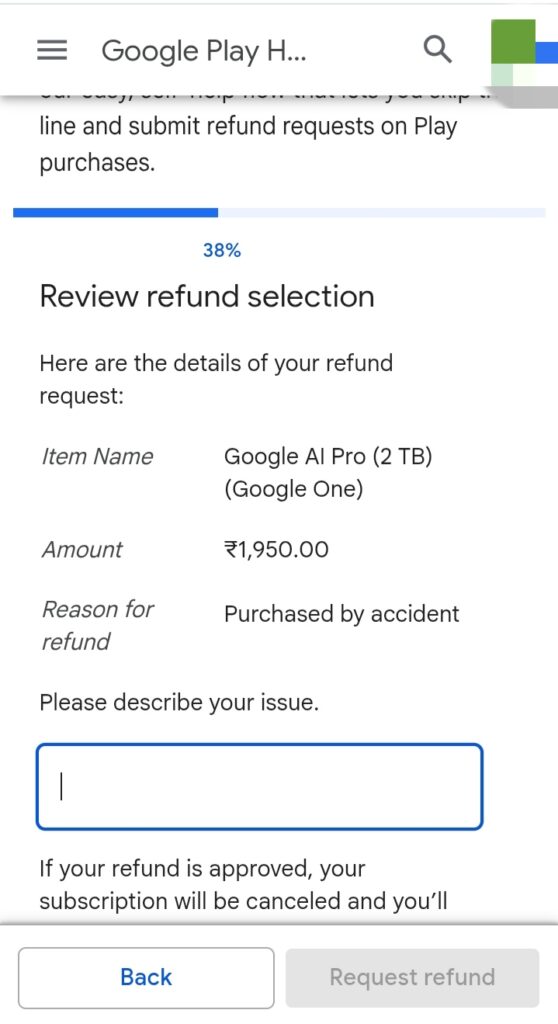
Step 6: Reason Select करें और Request Submit करें
Available reasons में से सही option चुनें, जैसे subscription unintended थी या service की आवश्यकता नहीं थी। Details review करने के बाद refund request submit कर दें।
Google play refund step
Request submit होने के बाद Google Play की तरफ से एक confirmation email भेजा जाता है। इसके बाद request review process में चली जाती है, और final decision Google Play की refund policy के अनुसार लिया जाता है।
Students के लिए यह जरूरी है कि refund request submit करते समय सही और honest information दें। Google refund policy genuine cases को evaluate करती है, और approval subscription usage, timing और policy criteria पर depend करता है।
Google Subscription Refund आने में कितना समय लग सकता है?
जब students Google subscription refund request submit करते हैं, तो एक natural सवाल होता है कि refund account में कब reflect होगा। Google Play का refund process instant नहीं होता, क्योंकि इसमें request review और payment processing दोनों शामिल होते हैं।
Refund का actual time इस बात पर depend करता है कि payment किस method से की गई थी और संबंधित bank या payment service provider transaction को कितनी जल्दी process करता है।
Different Payment Methods के अनुसार Estimated Refund Time
UPI: आमतौर पर 1 से 5 working days
Debit / Credit Card: लगभग 3 से 10 working days
Net Banking: सामान्यतः 5 से 10 working days
यह timelines estimated होती हैं। Refund approve होने के बाद भी bank processing, weekends या public holidays की वजह से
amount account में आने में थोड़ा extra time लग सकता है।
Refund Status कैसे Check करें?
Refund request submit करने के बाद Google Play आमतौर पर confirmation email भेजता है। इसके अलावा students अपने Google Play Store account में जाकर payments history या orders section से refund status check कर सकते हैं।
अगर refund तुरंत दिखाई न दे, तो घबराने की जरूरत नहीं होती। कई cases में status update होने में कुछ additional working days लग सकते हैं।
Students को कब Google Support से Contact करना चाहिए?
अगर refund request submit करने के 10 working days बाद भी amount account में reflect नहीं होती, तो students Google Play Help section के ज़रिए support से contact कर सकते हैं।
Support से contact करना policy के खिलाफ नहीं होता, लेकिन refund process में time लगना normal है। इसलिए patience रखना और official timelines को ध्यान में रखना students के लिए ज़्यादा helpful होता है।
अगर Google Subscription Refund Reject हो जाए तो Students क्या कर सकते हैं?
कुछ situations में students सही तरीके से
Google subscription refund request submit करते हैं, फिर भी refund approve नहीं होता। ऐसे cases में घबराने की जरूरत नहीं होती, बल्कि यह समझना ज़रूरी होता है कि refund decision कैसे लिया जाता है और आगे कौन-से practical steps available होते हैं।
यह समझना important है कि Google refund policy case-by-case basis पर work करती है। अगर subscription लंबे समय से active रही हो या paid service का regular use हो चुका हो, तो system refund approve नहीं कर सकता।
Refund Reject होने के Common Reasons
Subscription renewal के बाद काफी समय बीत चुका हो
Paid features या services का noticeable या regular usage हो चुका हो
Refund request charge के काफी समय बाद submit की गई हो
Same account से multiple refund requests का history होना
Refund Reject होने पर Students क्या कर सकते हैं?
अगर refund approve नहीं होता, तो सबसे पहले Google Play से आए rejection email या notification को ध्यान से पढ़ें। अक्सर उसमें refund decision से जुड़ी basic information दी होती है।
कुछ limited situations में students Google Play Help section के ज़रिए support से contact कर सकते हैं और politely explain कर सकते हैं कि subscription unintentionally renew हुई थी और service का meaningful use नहीं किया गया था।
हालाँकि, यह भी समझना जरूरी है कि refund reject होने के बाद बार-बार request submit करना या aggressive language का इस्तेमाल करना refund outcome को change नहीं करता।
अगर refund possible न हो, तो इसे एक learning experience की तरह लेना ज़्यादा helpful होता है और future में ऐसी situation avoid करने के लिए subscription settings, renewal dates और billing details पर ध्यान देना जरूरी होता है।
Future में Auto-Renewal से कैसे बचें? Students के लिए Smart Tips
Google subscription refund मिल जाना helpful हो सकता है, लेकिन long-term solution यह है कि future में गलती से Google subscription renew होने की situation ही न बने। अगर students subscription system को समझकर कुछ simple habits अपनाएं, तो auto-renewal से जुड़ी problems को काफी हद तक avoid किया जा सकता है।
1. Free Trial लेते ही Cancel करने की आदत बनाएं
एक practical habit यह है कि free trial activate करने के बाद subscription को तुरंत cancel कर दिया जाए। Google Play की subscription system में cancel करने के बाद भी trial period आमतौर पर end date तक चलता रहता है, लेकिन auto-renewal का risk नहीं रहता।
2. Trial End Date का Reminder Set करें
अगर कोई student trial को पूरा use करना चाहता है, तो trial end date से पहले का reminder या alarm set करना helpful होता है। इससे समय रहते decision लिया जा सकता है और accidental Google subscription से बचाव होता है।
3. Payment Methods को Regularly Review करें
Students को समय-समय पर अपने Google account की payment settings check करनी चाहिए। Saved UPI या card details को review करने से यह clear रहता है कि कौन-से payment methods active हैं। Unnecessary या unused payment methods को हटाने से future billing confusion कम हो सकती है।
4. Monthly Subscription Review की Habit बनाएं
हर महीने कुछ मिनट निकालकर Google Play Store subscriptions list check करना एक healthy digital habit है। इससे active subscriptions का status clear रहता है और जो services अब useful नहीं हैं, उन्हें समय पर cancel किया जा सकता है।
5. Parent के Card का Use Awareness के साथ करें
अगर students parents का card use करते हैं, तो subscription rules, auto-renewal और billing cycle को समझना जरूरी होता है। Clear communication और awareness से unintended charges और confusion से बचा जा सकता है।
6. Pocket Money और Budget Planning पर ध्यान दें
Students की pocket money आमतौर पर limited होती है, इसलिए online subscriptions लेने से पहले अपनी जरूरत और monthly budget को evaluate करना जरूरी है। Unnecessary subscriptions से बचना better financial discipline develop करने में मदद करता है।
अगर students इन simple और smart tips को follow करें, तो future में unwanted renewals से बचा जा सकता है और Google subscription refund कैसे लें जैसे सवालों की जरूरत काफी हद तक कम हो जाती है।
Students के लिए सीख: Online Subscriptions और Pocket Money Management
आज के digital environment में students के लिए online subscriptions काफी common हो गई हैं। Learning apps, cloud storage और premium features अक्सर एक click में available होते हैं। ऐसे में सुविधा के साथ-साथ खर्च को समझदारी से manage करना भी जरूरी हो जाता है।
Google subscription refund से जुड़ा experience students को एक practical financial learning देता है — digital payments करना आसान है, लेकिन spending को plan करना और monitor करना एक skill है जो समय के साथ develop होती है।
Pocket Money Limited होती है, इसलिए Decisions सोच-समझकर लेने जरूरी हैं
Students की pocket money या monthly allowance आमतौर पर limited होती है। इसलिए कोई भी online subscription लेने से पहले यह evaluate करना helpful होता है कि वह service actual जरूरत के लिए है या सिर्फ short-term convenience के लिए।
अगर बार-बार accidental Google subscription renew हो जाती है, तो यह इस बात का संकेत हो सकता है कि subscription tracking या budget planning पर और ध्यान देने की जरूरत है।
Online Payments में Awareness क्यों जरूरी है?
Online payments fast और convenient होते हैं, लेकिन awareness के बिना billing systems को समझना मुश्किल हो सकता है। Students के लिए यह जानना जरूरी है कि free trial, auto-renewal और refund policy एक defined system के तहत काम करते हैं।
जब students subscription terms, renewal dates और payment settings को समझकर manage करते हैं, तो future में Google subscription refund कैसे लें जैसे situations कम होती हैं।
Early Financial Discipline के Long-Term Benefits
छोटी-छोटी habits जैसे monthly expense review, active subscriptions की checking और pocket money planning students को long-term में financially responsible बनने में मदद करती हैं।
अगर students शुरुआत से ही online subscriptions और expenses को track करना सीख लेते हैं, तो आगे चलकर credit cards, EMIs और investments जैसे financial tools को समझना और manage करना उनके लिए आसान हो जाता है।
Frequently Asked Questions (FAQs)
Q1. गलती से Google subscription renew हो जाए तो क्या refund मिल सकता है?A. हाँ, अगर Google subscription गलती से renew हुई है और आपने जल्दी refund request submit की है, तो कई cases में refund मिल सकता है। हालांकि refund पूरी तरह Google refund policy पर depend करता है।
Q2. क्या Students के लिए Google subscription refund guaranteed होता है?A. नहीं, Google subscription refund guaranteed नहीं होता। Google हर request को case-by-case basis पर review करता है। अगर service का ज्यादा use नहीं हुआ है और request timely है, तो refund मिलने की chances ज्यादा होती हैं।
Q3. Free trial खत्म होने के बाद पैसे कट जाएं तो refund मिल सकता है?A. अगर free trial खत्म होते ही Google subscription auto renew हो गई है और आपने तुरंत refund request की है, तो refund मिलने की possibility रहती है। Delay करने पर chances कम हो जाती हैं।
Q4. Google subscription refund आने में कितना time लगता है?A. Payment method के according refund time अलग-अलग हो सकता है। Generally UPI में 1–3 days और card payments में 3–7 working days लग सकते हैं। Bank holidays की वजह से कभी-कभी थोड़ा delay भी हो सकता है।
Q5. अगर Google refund reject हो जाए तो students क्या करें?A. अगर refund reject हो जाए, तो students rejection reason को समझें और
politely Google support से contact कर सकते हैं। लेकिन बार-बार request submit करना या गलत information देना avoid करना चाहिए।
Q6. Future में accidental Google subscription से कैसे बचें?A. Free trial लेते ही subscription cancel करना, reminders set करना और Google Play Store subscriptions regularly check करना accidental subscription renew होने से बचने के सबसे effective तरीके हैं।
Conclusion: Students Panic नहीं करें, Awareness से Problem Solve होती है
गलती से Google subscription renew हो जाना कोई uncommon या serious failure नहीं है, बल्कि यह एक ऐसी situation है जो कई students digital services use करते समय experience करते हैं। यह system को समझने का एक learning moment होता है, ना कि किसी तरह की personal गलती।
अगर सही समय पर Google subscription refund request submit की जाए और official process follow किया जाए, तो कुछ situations में refund possible हो सकता है। हालाँकि refund हर case में guarantee नहीं होता, लेकिन इससे students को यह समझने का मौका मिलता है कि digital payment systems कैसे work करते हैं।
Online subscriptions use करते समय free trial, auto-renewal और refund policy की basic understanding students को unnecessary stress और unexpected charges से बचाने में मदद करती है। Limited pocket money के साथ informed और planned decisions लेना early financial discipline की एक important step है।
इस guide का उद्देश्य सिर्फ यह बताना नहीं था कि Google subscription refund कैसे लें, बल्कि यह भी explain करना था कि future में ऐसी situation को कैसे avoid किया जा सकता है। अगर students शुरुआत से ही online expenses और subscriptions को consciously manage करना सीखते हैं, तो long-term में financial decisions लेना आसान हो जाता है।
अंत में यही सीख है कि panic करने के बजाय process को समझना ज़्यादा effective होता है। Awareness के साथ decisions लेने से technology को responsibly use किया जा सकता है और digital tools students के favour में काम करते हैं।